25ทารก 25นมผง
25โรคและอาการที่พบบ่อยที่สุดในทารก
กับ25ยี่ห้อนมที่"มีประสิทธิภาพดีที่สุด"ในแต่ละอาการ
*เป็นกลาง จากทุกบริษัทในประเทศไทย Snow, Meadjohnson, Danone, Nestle, PHC, Abbott
**(+งานวิจัย) = มีงานวิจัยทางการแพทย์
***แต่ละยี่ห้อมีราคาแตกต่างกันมากพอสมควร
1. แพ้นมวัว(ต่ำกว่า1ขวบ) >> Nutramigen ดีที่สุด (+งานวิจัย) หยุดอาการได้ภายใน48ชั่วโมง
2. แพ้นมวัว(เกิน1ขวบ) >> Isomil2 ดีที่สุด รสหวาน ทานง่าย
3. ป้องกันแพ้นมวัว(ต่ำกว่า1ขวบ) >> Enfalac HA ดีที่สุด
4. ป้องกันแพ้นมวัว(เกิน1ขวบ) >> NAN HA2 ดีที่สุด (+งานวิจัย)
5. อ้วกแบบไหล >> Hi-Q comfort ดีที่สุด (+งานวิจัย)
6. อ้วกแบบพุ่ง >> Enfalac Gentle Care ดีที่สุด (+งานวิจัย) หยุดอาการได้ภายใน1วัน
7. Colic(ร้องไม่หยุด,ร้องโยเย) >> Nutramigen ดีที่สุด หยุดอาการได้ภายใน48ชั่วโมง
8. นมถั่วเหลือง >> Enfalac Soy Care ดีที่สุด เสริมDHA,ARA
9. Eczema(ผื่นแพ้ผิวหนัง) >> Nutramigen ดีที่สุด (+งานวิจัย)
10. ท้องอืด >> Similac Comfort ดีที่สุด ไม่มีLactose
11. มีแก๊ส,ลมในท้อง >> Enfalac Gentle Care ดีที่สุด (+งานวิจัย)
12. สายตา >> S26 ลูทีน ดีที่สุด
13. ท้องเสีย(ต่ำกว่า1ขวบ) >> Enfalac Lacto-free ดีที่สุด
14. ท้องเสีย(เกิน1ขวบ) >> Hi-Q 1plus Soy ดีที่สุด (+งานวิจัย)
15. น้ำหนักต่ำกว่าเกณฑ์(ต่ำกว่า1ขวบ) >> Enfalac Catch Up Care ดีที่สุด (+งานวิจัย)
16. น้ำหนักต่ำกว่าเกณฑ์(เกิน1ขวบ) >> Pedia Sure ดีที่สุด รสหวาน ทานง่าย
17. ท้องผูก(ต่ำกว่า1ขวบ) >> Snow 1 ดีที่สุด (+งานวิจัย) มีงานวิจัยในประเทศญี่ปุ่น
18. ท้องผูก(เกิน1ขวบ) >> Enfalac A Plus 2 ดีที่สุด
19. ความฉลาด >> Enfa ดีที่สุด (+งานวิจัย) มีงานวิจัยในประเทศอเมริกา
20. สารอาหารเติมนมแม่(สำหรับคลอดก่อนกำหนด) >> Enfamil Human Milk Fortifier ดีที่สุด
21. จำเป็นต้องกินนมไก่ >> รพ.ศิริราช ดีที่สุด ทำสดใหม่สำหรับทารก
22. จำเป็นต้องกินนมแพะ >> นมแพะDG ดีที่สุด
23. ลำไส้สั้น(ต่ำกว่า1ขวบ) >> Pregestimil ดีที่สุด (+งานวิจัย)
24. ลำไส้สั้น(เกิน1ขวบ) >> Pan-Enteral ดีที่สุด
25. Anaphylaxis >> Puramino,Neocate ประสิทธิภาพใกล้เคียงกันมาก
วันศุกร์ที่ 14 ตุลาคม พ.ศ. 2559


วันจันทร์ที่ 3 ตุลาคม พ.ศ. 2559
Run-time(E0009)
The software is required to incorporate the
Sentinel Protection System as part of agreements with third-party
supplies of libraries and object code. If the error "Waiting until
Sentinel LDK Run-Time Environment is available" arises when the software
is started then the problem is likely that the Sentinel license manager
service has unexpectedly stopped or has not been set to automatic
startup. It could also mean that the software license is not currently
up to date. Try the steps below to fix this condition. The error would
normally look like this:


The "Status" of the service should be "Running" and the "Startup Type" should be "Automatic". If the service Status is already shown as "Running" then the software license needs to be updated. Please go here and follow Steps 4 & 5 only.
It the service does not have a status entry then it is stopped. Right click license manager service entry and from the sub-menu click "Start". If the Startup Type condition of the service is not set to "Automatic" then please continue to Step 3, otherwise the original error should not now occur when starting the software.


STEP 1 - OPEN THE WINDOWS SERVICES CONSOLE
To access the Sentinel license manager service and determine its current status open the Windows Services Console. To do this then run the command "services.msc" from the Windows/Start menu and/or "Run" box in Windows 8 or Windows 10.STEP 2 - START THE SENTINEL LICENSE MANAGER SERVICE
Review the status of the Sentinel license manager service that is installed on the machine. Once the Windows Services Console starts the various services can be sorted by their name. Scroll down to the entry for the "Sentinel LDK License Manager" or "Sentinel Local License Manager" service and review its current condition. If for some reason you cannot find an entry for a service called "Sentinel LDK License Manager" or "Sentinel Local License Manager" the license manager and associated drivers need to be reinstalled. Follow the instructions available here.The "Status" of the service should be "Running" and the "Startup Type" should be "Automatic". If the service Status is already shown as "Running" then the software license needs to be updated. Please go here and follow Steps 4 & 5 only.
It the service does not have a status entry then it is stopped. Right click license manager service entry and from the sub-menu click "Start". If the Startup Type condition of the service is not set to "Automatic" then please continue to Step 3, otherwise the original error should not now occur when starting the software.
STEP 3 - START THE LICENSE MANAGER SERVICE TO AUTOMATIC
If the Sentinel license manager service did not show "Automatic" as its Startup Type then the service needs its startup condition changed. Right click the service and select the sub-menu option "Properties". Drop down the Startup Type list box and select the entry "Automatic". Click the button "Apply" and then click the button "OK" to save this startup condition. The license manager will now automatically start each time the machine is rebooted.this app can't open windows วิธีแก้
This app can't open can't be opened using the Built-in Administrator account.
Sign in with a different account and try again.
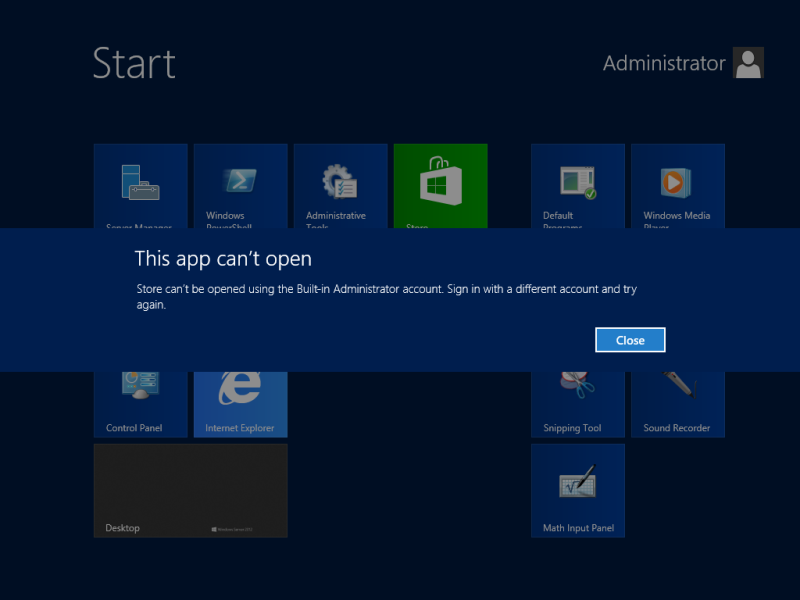 เคยเป็นแบบนี้กันไหมครับเปิดแอพที่ติดมากับวินโดว์ 8 แล้วขึ้นข้อความข้างบน
หรือเป็นแบบนี้
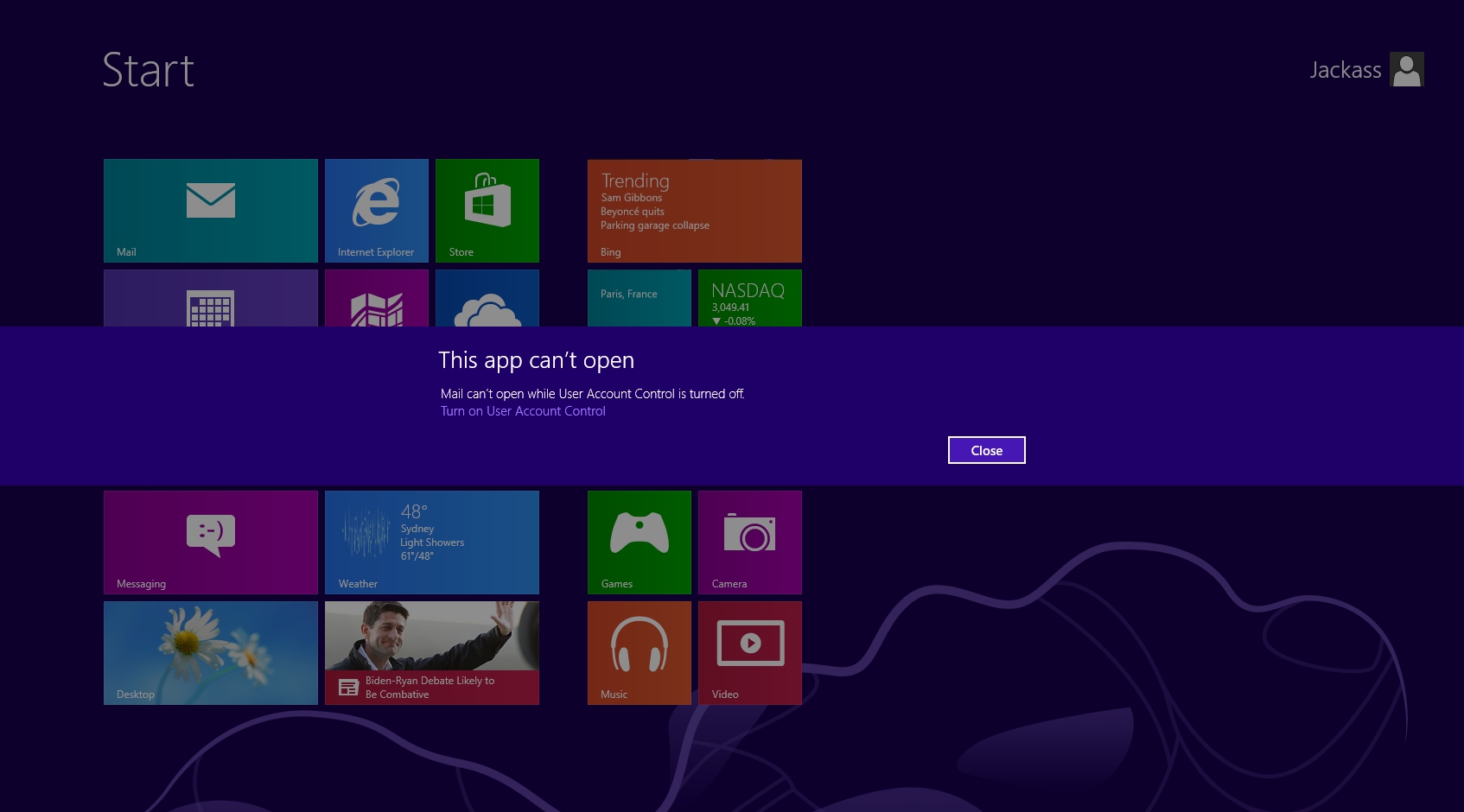
วิธีแก้
1.กดปุ่ม Windows+R (ปุ่มบนคีย์บร์อดที่กดแทนstart+ปุ่มRพร้อมกัน) จะขึ้นหน้าต่่างRUNขึ้นมา
2.พิมพ์ secpol.msc ลงไปแล้วกด OK
3.เข้าไปที่ Local Polices -> SecurityOption->มองท้านซ้ายของหน้าต่าง->User Accout Contron :Admin Approval Mode for the Built-in Administrator account
->เปลี่ยนจากDisableเป็นEnabled
จากข้อ3
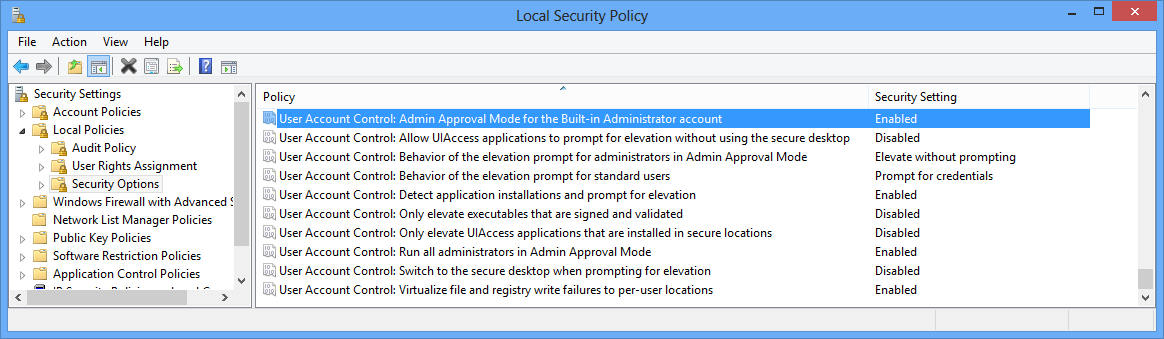
4.รีสต๊าสเครื่อง เสร็จจ่ะ
ขอบคุณข้อมูลจาก http://www.rukcode.com
Sign in with a different account and try again.
หรือเป็นแบบนี้
วิธีแก้
1.กดปุ่ม Windows+R (ปุ่มบนคีย์บร์อดที่กดแทนstart+ปุ่มRพร้อมกัน) จะขึ้นหน้าต่่างRUNขึ้นมา
2.พิมพ์ secpol.msc ลงไปแล้วกด OK
3.เข้าไปที่ Local Polices -> SecurityOption->มองท้านซ้ายของหน้าต่าง->User Accout Contron :Admin Approval Mode for the Built-in Administrator account
->เปลี่ยนจากDisableเป็นEnabled
จากข้อ3
4.รีสต๊าสเครื่อง เสร็จจ่ะ
ขอบคุณข้อมูลจาก http://www.rukcode.com
วันพุธที่ 28 กันยายน พ.ศ. 2559
PSL ฟ้อนต์โรงพิมพ์ 2000 กว่าฟ้อนต์
PSL ฟ้อนต์โรงพิมพ์ 2000 กว่าฟ้อนต์
#font64
#fontงานแต่ง
ฟ้อนต์สวยๆ มากกว่า 2000 ฟ้อนต์ ติดตั้งลงเครื่องพร้อมใช้งานได้ทันที ที่โรงพิมพ์ใช้กันในงานด้านการออกแบบ ทำหนังสือพิม ป้ายโฆษณา และยังมีอีกมากมาย สารพัดประโยชน์จิง หากใครมองหาฟ้อนอยู่ล่ะก็รีบโหลดเก็บไว้เลย อากจะบอกว่าหายากจริงๆ ครับ เพราะเขาขายกนหมดแล้ว และราคาก็น่าตกใจ
วันพฤหัสบดีที่ 8 กันยายน พ.ศ. 2559
Security Center เปิดไม่ได้
ที่ run พิมพ์ services.msc เอ็นเทอร์ มองไปทางขวามือ กลางๆน่ะ หา Security Center แล้วดับเบิ้ลคลิก
ตรง startup type เลือกเป็น Automatic แล้ว Apply แล้ว start แล้ว ok แล้ว รีสตาร์ทคอม
วันศุกร์ที่ 22 เมษายน พ.ศ. 2559
ACDSee Ultimate 9.2 Build 649 (x64)

ACDSee Ultimate 9.2 Build 649 (x64)
As the first digital asset management software with layers, ACDSee Ultimate 9 is able to answer an unparalleled number of creative graphic and image composition needs. Armed with a potent list of adjustment layers, working with layers just became non-destructive, giving you the complete flexibility to create the image composites, photo manipulations, and innovative graphics you've been envisioning.
With new ways to track your adjustments and apply them to batches, development snapshots, extended creative capabilities through Photoshop™ plugin support, new lighting and skin tone adjustments, additional ways to compartmentalize, even more drawing tools, improved lens correction, high DPI support, and so much more, ACDSee Ultimate 9 packs a valuable punch.
What's New:
- Dynamic, Non-Destructive Editing with Adjustment Layers
- ACDSee Actions — Automate with Ease
- Distortion Doctoring with Lens Correction
- Snapshots — Your Adjustment Freeze Frame
- Classify with Collections
- Photos Mode — Your Aerial View
- Dehaze — Taking Your Murkiest Images Out of Obscurity
- Skin Tune — Flawless and Radiant
- Extended Editing Capabilities with Photoshop™ Plugin Support
- 4K Support — Your Resolution Revolution
- New Filters — Apply Some Magic
System Requirements:
- Microsoft® Windows® 7 (SP1), Windows® 8, Windows® 8.1 & Windows® 10 (64-bit editions only)
- Microsoft® Internet Explorer® 9+
- Microsoft® DirectX® 10 or higher
- Windows Media® Player 9.0
What's New in Version 9.2 Build 649 ?


VMware Workstation Pro 12.1.1 Build 3770994

VMware Workstation Pro transforms the way technical professionals develop, test, demonstrate and deploy software by running multiple x86-based operating systems simultaneously on the same PC. Built on 15 years of virtualization excellence and winner of more than 50 industry awards, VMware Workstation Pro takes desktop virtualization to the next level by giving users an unmatched operating system support, rich user experience and incredible performance.
Introducing Workstation 12 Pro
VMware Workstation 12 Pro continues VMware’s tradition of delivering leading edge features and performance that technical professionals rely on every day when working with virtual machines. With support for the latest version of Windows and Linux, the latest processors and hardware, and the ability to connect to VMware vSphere and vCloud Air, it's the perfect tool to increase productivity, save time and conquer the cloud.
- Built for Microsoft Windows 10 and More
- Display Powerful 3D Graphics
- Ready for High Resolution Displays
- Create Powerful Virtual Machines
- Ready for the Latest Hardware
- Enhanced Connectivity
- Build Virtual Networks
- Leverage the Power of vSphere and vCloud Air
- User Interface
- Expiring Virtual Machines
- Virtual Machine Cross Compatibility
- Protect Your Work and Save Time
- Run Restricted Virtual Machines
Workstation 12 now provides vCloud Air power operations so you can power on/off or suspend/resume virtual machines saving extra steps and time.
Now with Workstation 12 Pro you can tear away a virtual machine tab to the desktop and create a whole new Workstation instance when you need to work with multiple virtual machines.
Workstation 12 Pro improves the performance of encrypted VMs during suspend and resume operations with up to 3x faster performance over previous versions of Workstation.
VMware Workstation 12.1.1 Pro Release Notes
สมัครสมาชิก:
บทความ (Atom)